
Surviving the Language Barrier in China: A Practical Guide
Essential apps, payment setup, and translation tricks for navigating China without speaking Mandarin. From WeChat mini-apps to live translation overlays.
Within an hour of landing in China, you’ll hit your first captcha:
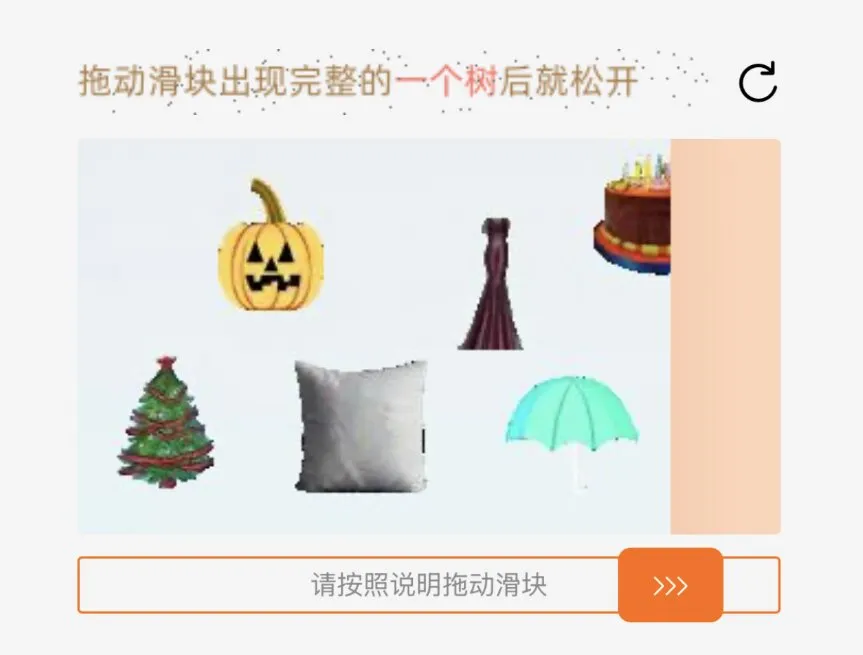
I have no idea what this wants. Pumpkin, pillow, umbrella, Christmas tree, birthday cake. A slider. Chinese instructions I can’t read — and can’t translate, because the 120hz flickering noise overlay defeats any screenshot or OCR app. My workaround? Second phone, hope the camera shutter syncs like human vision. Chinese users never see these — their accounts are trusted. You’re suspicious by default.
This is navigating China without speaking Mandarin. But millions of foreigners figure it out every year. With the right apps and setup, the language barrier becomes manageable. Sometimes even fun.
Before you land: get your apps ready
Your phone is your survival kit. Set these up before you board:
WeChat — this is everything
WeChat isn’t just a messaging app. It’s how China works.
Most restaurants have QR codes on the table. Scan it, and a mini-app opens where you order food, pay, and call the waiter — all in Chinese. Same for coffee shops, hotels, tourist sites, museums.
WeChat’s built-in translation is surprisingly good for these mini-apps. Long-press any Chinese text and hit translate. It handles menus, buttons, and directions reasonably well.
For power users: Some WeChat features require a mainland China or HK number. If you’re staying long-term, you can grab an HK number from 3HK without being in Hong Kong. Not essential for a short trip, but helpful if you run into limitations.
Alipay — payments and more
Alipay is your wallet. Link your international credit card (it works now for tourists) and you can pay almost anywhere with QR codes.
One thing to know: your foreign card can only connect to an account registered with your home country phone number. So you’ll likely end up with multiple accounts anyway — one on your main number for payments, another on your HK/China number for local features.
Alipay is also a super-app. Inside it you’ll find:
- Didi — China’s Uber, directly inside Alipay
- Food delivery and grocery services
- Train tickets and travel bookings
- Mini-programs for almost everything
You can log into the standalone Didi app using Alipay authentication too. This connects your payment automatically.
SIM card — this solves the VPN problem too
Google, Instagram, Twitter, WhatsApp — none of these work in China. Most guides tell you to get a VPN. But there’s a better option.
The TSimTech Korea + China eSIM on Mobimatter routes all your traffic through Korea. That means all your social apps just work — no VPN needed. Order it before your trip, activate it when you land, done. No documents, no KYC, no registration.
But you still need a phone number for many things — WeChat features, app registrations, verification codes. I tried getting a 3HK SIM for the Hong Kong number, but at the time of my trip they required KYC documents and the verification process was laggy. Worth the hassle though — having an HK number unlocks more WeChat functionality than a western number.
For longer stays you might want a physical China SIM for better local coverage — but you’ll need your passport and sometimes a local address. For most trips, the roaming eSIM plus an HK number is the move.
Getting around: Didi and navigation
Didi is essential. Taxis exist but finding one that’ll take a foreigner who can’t speak Chinese is hit or miss. Didi handles the destination and payment automatically.
Skip the Mercedes, book a ZEEKR
Here’s something that’ll surprise you: the Chinese electric MPVs on Didi are better than the European luxury options. And often the same price.
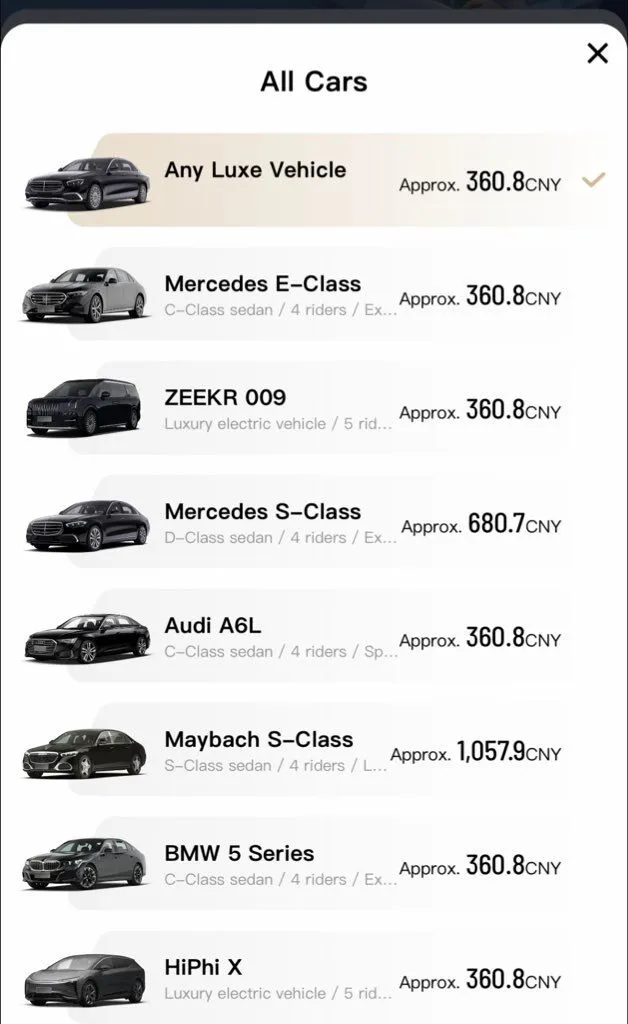
Didi Luxe: ZEEKR 009 same price as Mercedes E-Class (360 CNY)
The foreign options — Mercedes E-Class, BMW 5 Series, Audi A6L — feel underwhelming once you’ve tried a ZEEKR 009. These Chinese electric MPVs have zero-gravity seats, massive entertainment screens, ambient lighting, and whisper-quiet rides. For airport transfers especially, there’s no comparison.

ZEEKR 009 on a Shanghai street

Inside: screens, zero-gravity seats, space for days
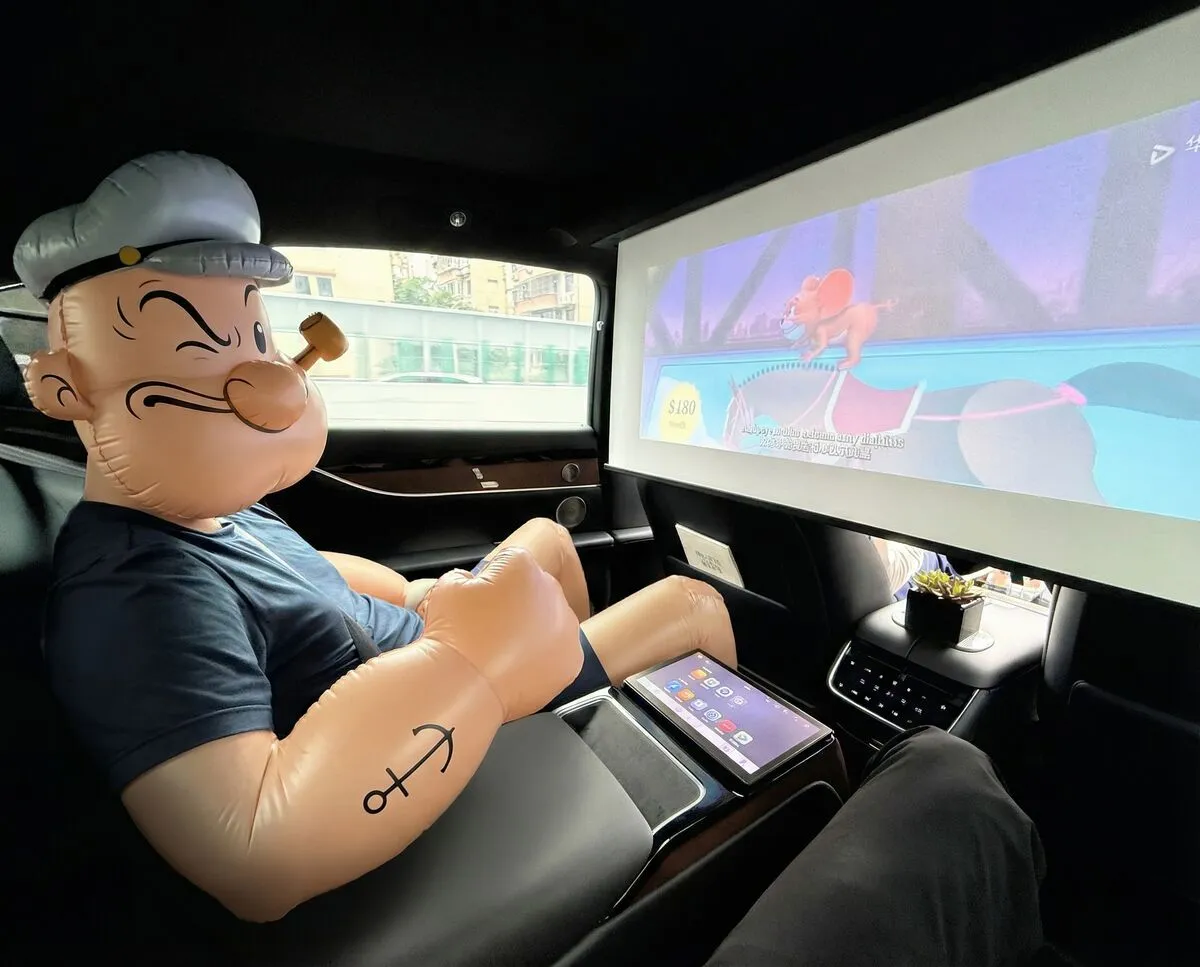
Some Chinese sedans even have projector screens in the back — actual cinema experience during your ride:
Yes, that’s a built-in projector screen. And yes, there’s a tiny potted succulent on the armrest. Chinese Didi drivers just hit different.
Pro tips:
- Book ZEEKR 009 from Luxe or Premium XL for airport transfers — best ride in China
- Premium XL beats Luxe XL — Chinese domestic MPVs are genuinely better than imported Mercedes vans
- Use Didi inside Alipay if the standalone app gives you captcha trouble
Navigation apps look completely different
Forget Google Maps — it doesn’t work properly in China anyway. You’ll use Amap (高德地图) or Baidu Maps.
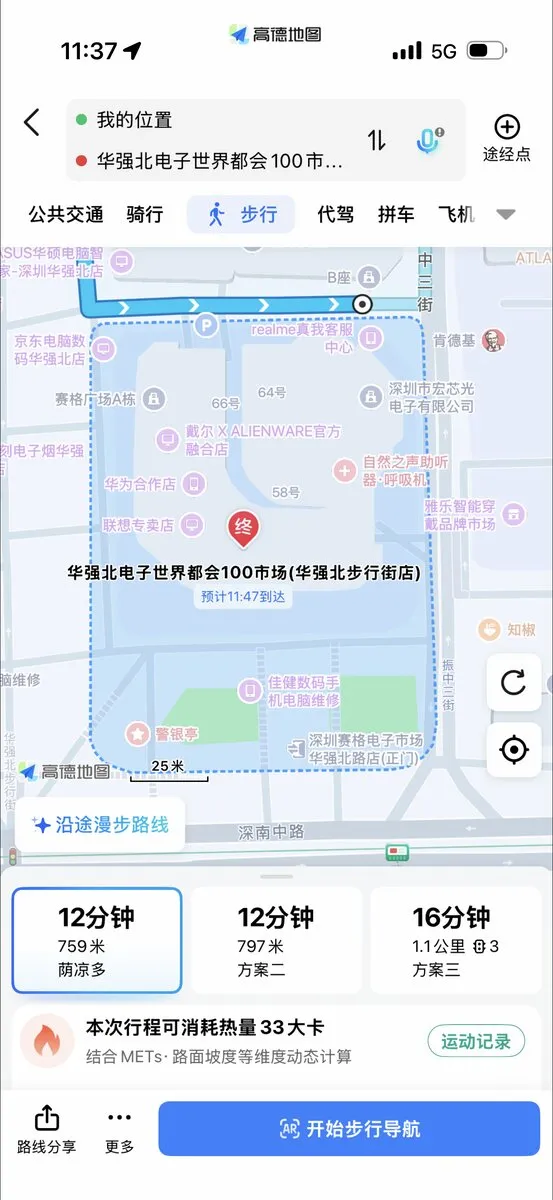
Original — entirely in Chinese
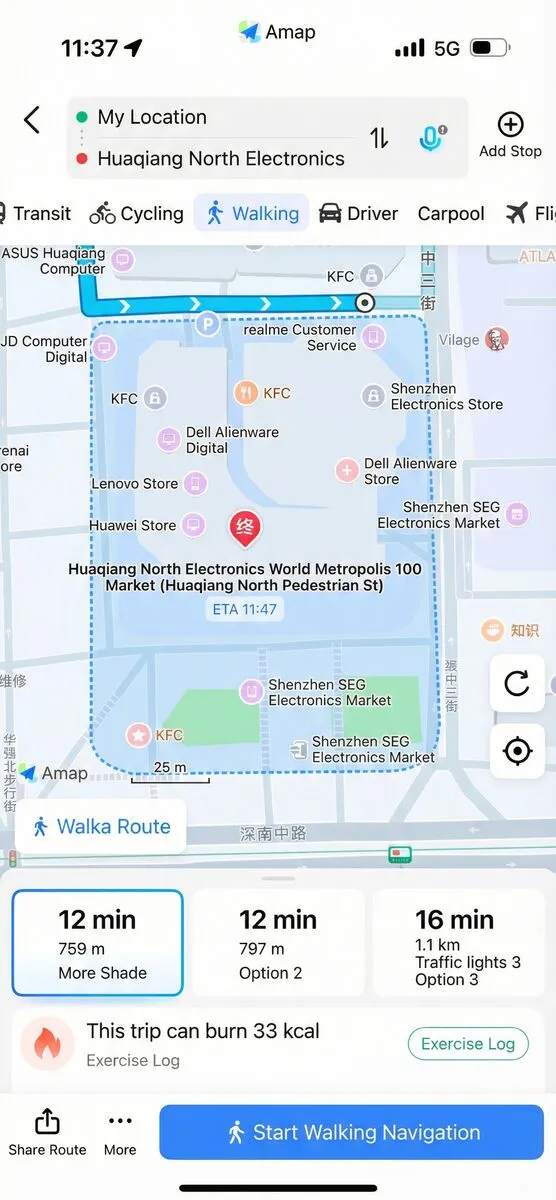
With PiP Screen Translate overlay
These apps are actually excellent — accurate, fast, integrated with public transit and ride-hailing. But the UI is 100% Chinese. With the translation overlay, you can see “Walking”, “Transit”, “Carpool”, “Start Walking Navigation”, even “More Shade” for the shadiest route option.
The good news: numbers are universal. 12 minutes, 759 meters — that part you don’t need to translate.
Shopping and delivery apps
This is where China gets interesting. Everything is available for delivery, often within 30 minutes.
Taobao — the everything store
Taobao is Amazon on steroids. Anything you can imagine, someone sells it on Taobao. The app is dense with features.
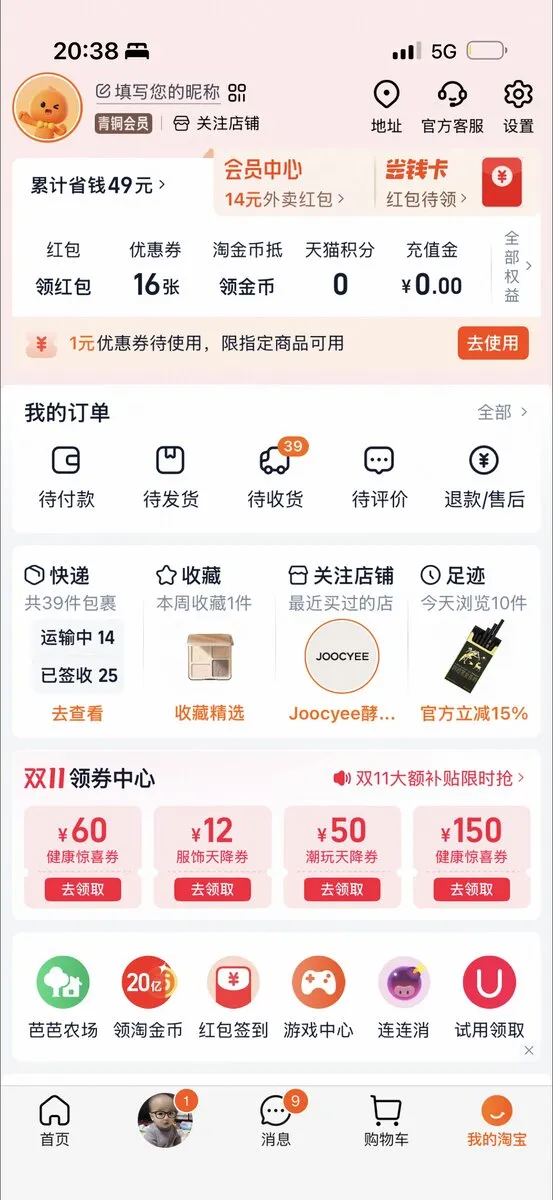
Original — dense Chinese interface
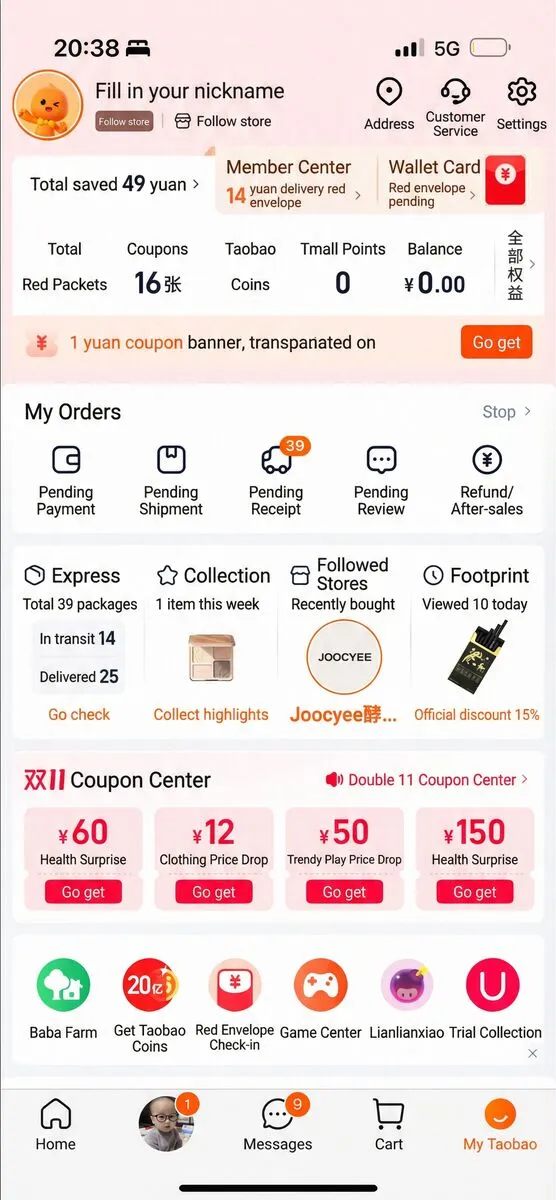
Translated — "Member Center", "My Orders", "Coupon Center"
The interface is overwhelming at first, but with translation you can navigate it: Member Center, Wallet Card, My Orders (with Pending Payment, Pending Shipment, Pending Review), Followed Stores, and the Double 11 Coupon Center with deals like “Health Surprise” and “Clothing Price Drop”.
Meituan — food, groceries, everything local
Meituan started as food delivery but now does groceries, pharmacy, services, and more.
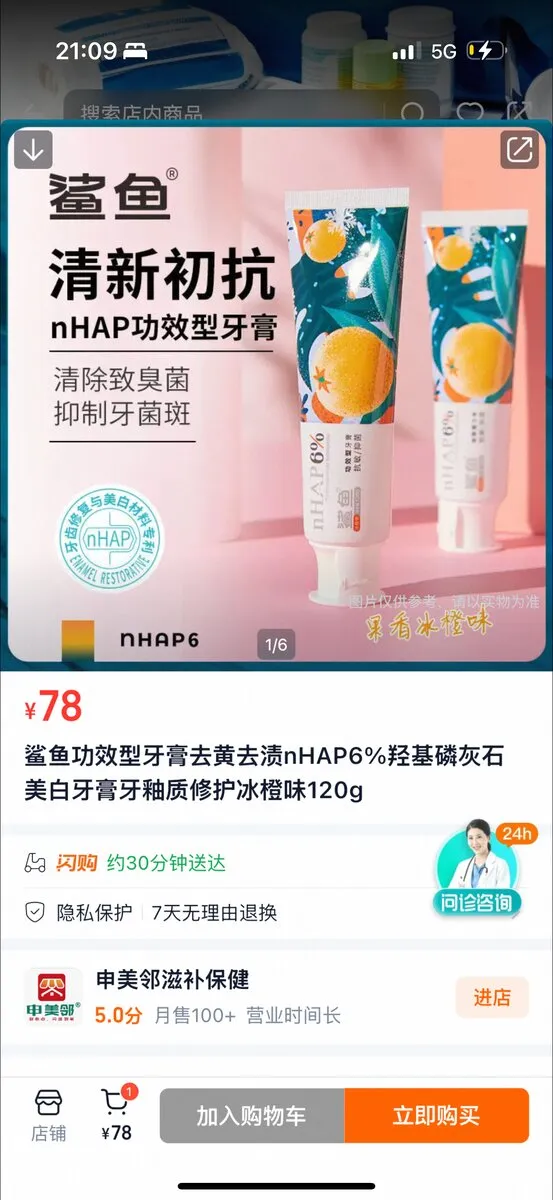
Original — what even is this product?
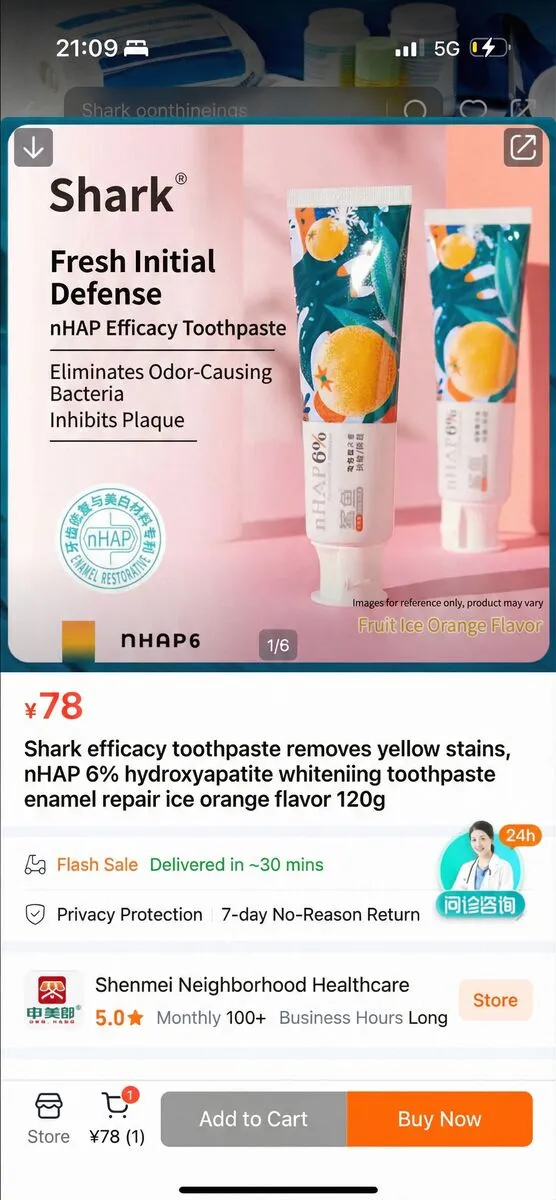
Translated — "nHAP Efficacy Toothpaste", "Delivered in ~30 mins"
With translation, you can actually understand what you’re buying. I was looking for nHAP toothpaste after reading some research on hydroxyapatite — turns out it’s everywhere in China. Without translation, I’d have no idea which product was which. Now I can see it’s “nHAP Efficacy Toothpaste”, delivered in 30 minutes, with a 7-day return policy.
Freshhippo (盒马) — premium groceries
For imported goods and familiar brands, Freshhippo is your best bet. Quality is high, selection is good, and delivery is fast.
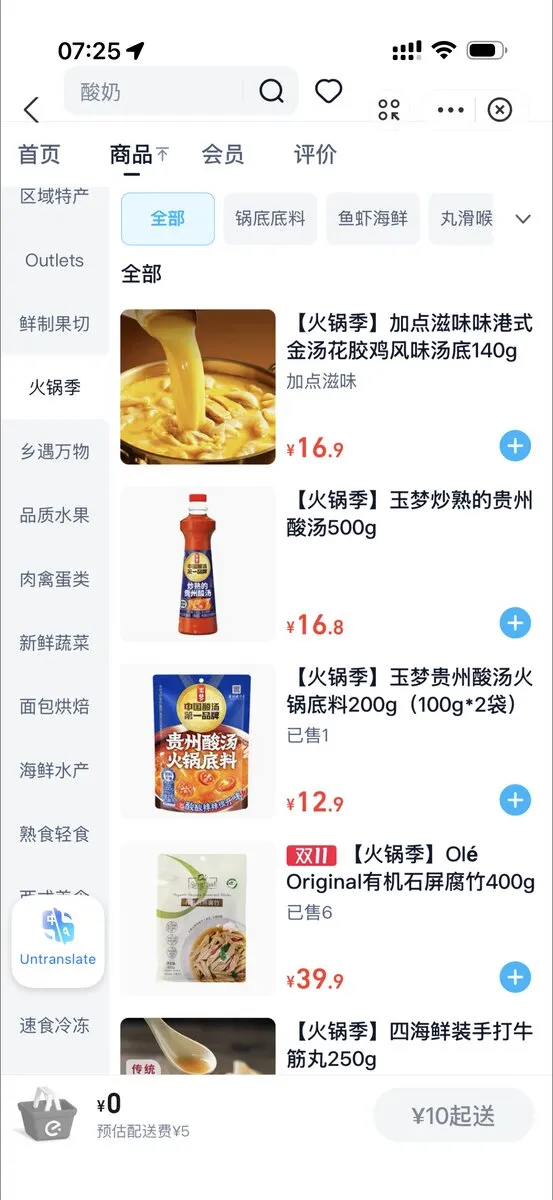
Original — product names and categories in Chinese
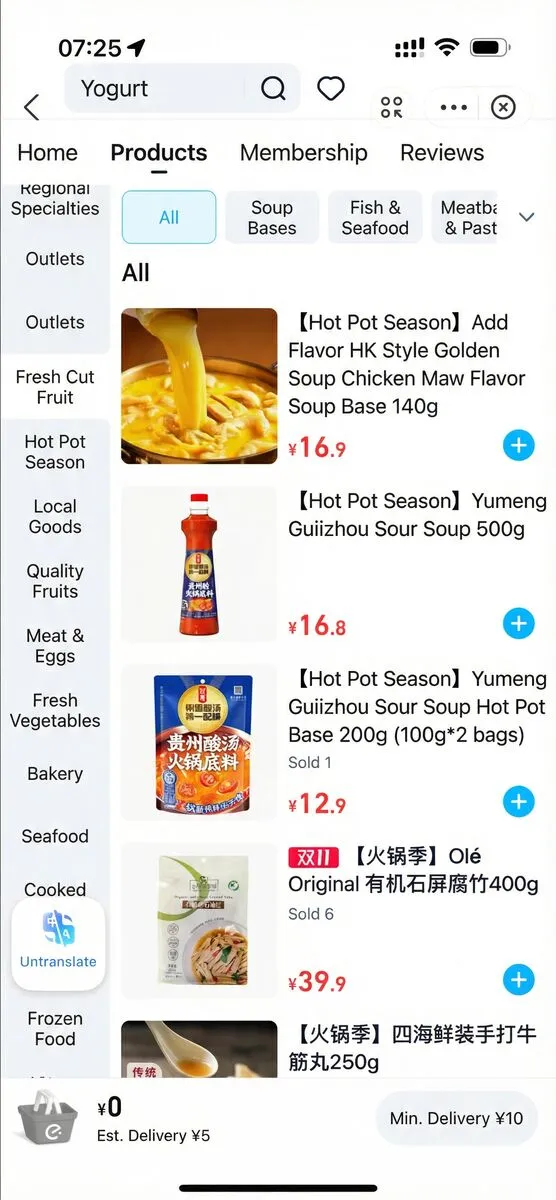
Translated — "Hot Pot Season", "Soup Bases", "Fish & Seafood"
With translation, you can actually browse by category: Soup Bases, Fish & Seafood, Meatballs. Product names become readable — “Yumeng Guizhou Sour Soup Hot Pot Base” instead of mystery characters.
Pro tip: Use the “sort by popular” (按销量排序) option when browsing categories. This surfaces products that locals actually buy, which helps when you can’t read all the descriptions. Popular items usually mean good quality-to-price ratio.
You can find international items like protein powder and supplements here. Sometimes searching in English works, but browsing translated categories is more reliable.
The translation stack
Different situations need different translation tools.
WeChat translation — for mini-apps
WeChat’s built-in translation handles most QR-code mini-apps well. Long-press text, tap translate. Works for restaurant ordering, Meituan, Taobao within WeChat, and most mini-programs.
Screenshot translation — quick lookups
iOS has a translate button on the screenshot screen. Take a screenshot, tap the translate button, done. Useful for quick lookups but interrupts what you’re doing.
Live translation overlay — for standalone apps
Here’s the gap I kept running into: Taobao, Meituan, Amap, Freshhippo — these are standalone apps with full Chinese interfaces. WeChat translation doesn’t work on them. And taking screenshots every 10 seconds gets old fast.
I got frustrated enough that I built PiP Screen Translate — a floating overlay that reads Chinese text via OCR and shows translations in real-time, right on top of whatever app you’re using. You can see it in action in the screenshots above.
The combination of WeChat translation for mini-apps and PiP Screen Translate for standalone apps covers most situations.
Daily life hacks
Getting sick
It happens. Pharmacies are everywhere and staff are usually helpful even with a language barrier. Point at your symptoms, use a translation app, they’ll figure it out.
For anything serious, international clinics in major cities have English-speaking staff but cost more. Your travel insurance should cover it.
The reality
China with zero Mandarin is challenging but doable. The first few days feel overwhelming — so much Chinese text everywhere, so many unfamiliar app interfaces. By week two, you’ve got your workflow.
WeChat for mini-apps. Alipay for payments. Didi for rides. VPN for sanity. Translation overlay for the standalone apps that don’t speak English.
The language barrier doesn’t disappear, but it becomes a puzzle you know how to solve.
Planning a China trip? Download PiP Screen Translate before you go. Test it on any Chinese text — menus, signs, apps — and you’ll be ready for the apps that WeChat can’t help with.